openrct2-plugin-vim
Vim commands for OpenRCT2
Author:
 rinode
Submitted:
6 months agoUpdated:
6 months agoStars:
0Tags:
License:
MITLinks:
GitHub Repository rinode on GitHubopenrct2-plugin-vim
Vim-style modal keybindings for OpenRCT2.
How it works
An off-screen window with a focused textbox captures all keypresses in normal mode. This gives you count prefixes, multi-key sequences, etc.
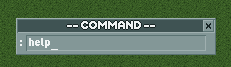
A small indicator window sits above the bottom toolbar. Its title shows the current mode (-- NORMAL -- or -- COMMAND --). In command mode, a textbox appears in the indicator for typing commands.
Normal mode
Navigation
| Key | Action |
|---|---|
h |
Scroll left |
j |
Scroll down |
k |
Scroll up |
l |
Scroll right |
[count]h/j/k/l |
Scroll N tiles (e.g. 5j scrolls 5 tiles down) |
gg |
Jump to map start (0, 0) |
G |
Jump to map end |
zz |
Jump to map centre |
Viewport
| Key | Action |
|---|---|
r |
Rotate left |
R |
Rotate right |
+ |
Zoom in |
- |
Zoom out |
Mode switching
| Key | Action |
|---|---|
: |
Enter command mode |
Command mode
Press : to open the command input. Type a command and press ENTER. Press ESCAPE to cancel.
| Command | Action |
|---|---|
:pause |
Pause the game |
:unpause |
Unpause the game |
:goto <x> <y> |
Jump viewport to world coordinates |
:wq |
Save and quit (opens save dialog) |
:q / :qa |
Quit (opens save dialog) |
:help |
Show command list in-game |
Add ! to force (e.g. :q!).
Installation
- Run
npm install - Copy
deploy.config.example.jsontodeploy.config.jsonand set your plugin path - Run
npm run build
Development
npm run build        # build once
npm run deploy       # copy to OpenRCT2 plugin directory (requires deploy.config.json)
npm run watch build  # rebuild on file change
Source files are in src/. Hot-reloading works if enable_hot_reloading = true is set in config.ini.
Toggling
Close the indicator window to turn the plugin off. All shortcuts stop working.
To turn it back on, go to the top toolbar menu and click Vim Keys.
Known issues
- The capture window holds keyboard focus at all times, which conflicts with native rename dialogs.
:q!/:qa!still shows the save dialog. The API does not support skipping it.