openrct2-objective-assistant
Your virtual assistant to help you complete any scenario objective!
Get plugin!
 MarkAlliban
Author:
MarkAlliban
Submitted:
4 months agoUpdated:
about 1 month agoStars:
4Tags:
License:
MITLinks:
GitHub Repository MarkAlliban on GitHubAn OpenRCT2 plugin to help achieve your objective!
A multi-tab plugin that helps monitor your objective progress and various other park statistics that aren't normally visible in-game.
Tab 1: Objective progress summary
- Shows current objective and how far you've progressed towards it.
- Button to proceed to the most relevant analysis tab.
Tab 2: Guest number objectives
- Shows current guest count, guest target, and soft guest cap (current / potential including closed/broken down rides).
- If soft guest cap changes, it will indicate this before the game picks up on it (next in-game day).
- List of rides, stalls and facilities, and how much each one contributes to the soft guest cap.
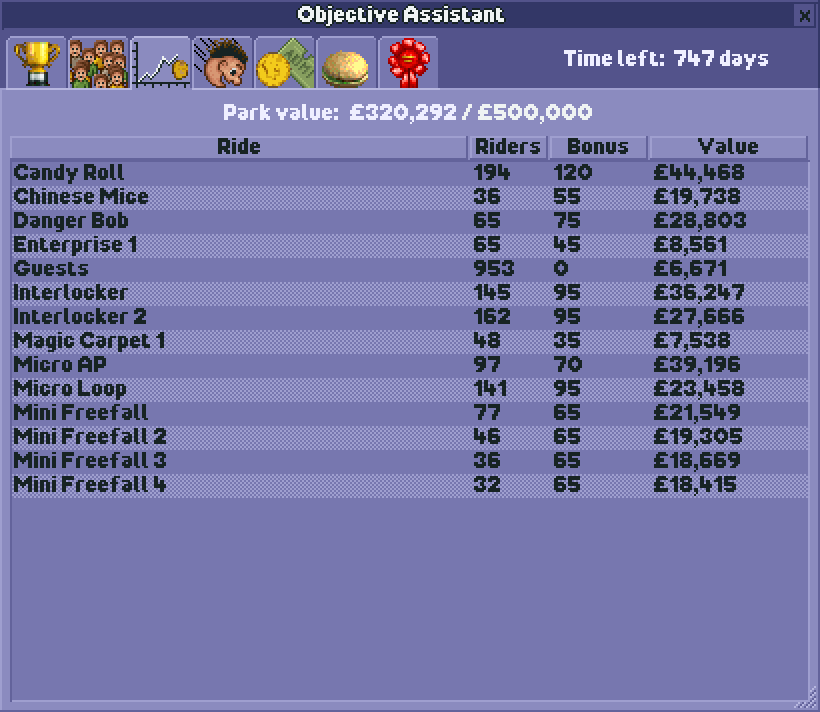
Tab 3: Park value objectives
- Current park value, target.
- List of rides and number of guests, and how much each one contributes to park value.
Tab 4: Coaster-building objectives
- How many qualifying coasters are required and how many are completed.
- Which types have been built; any duplicate types are coloured orange.
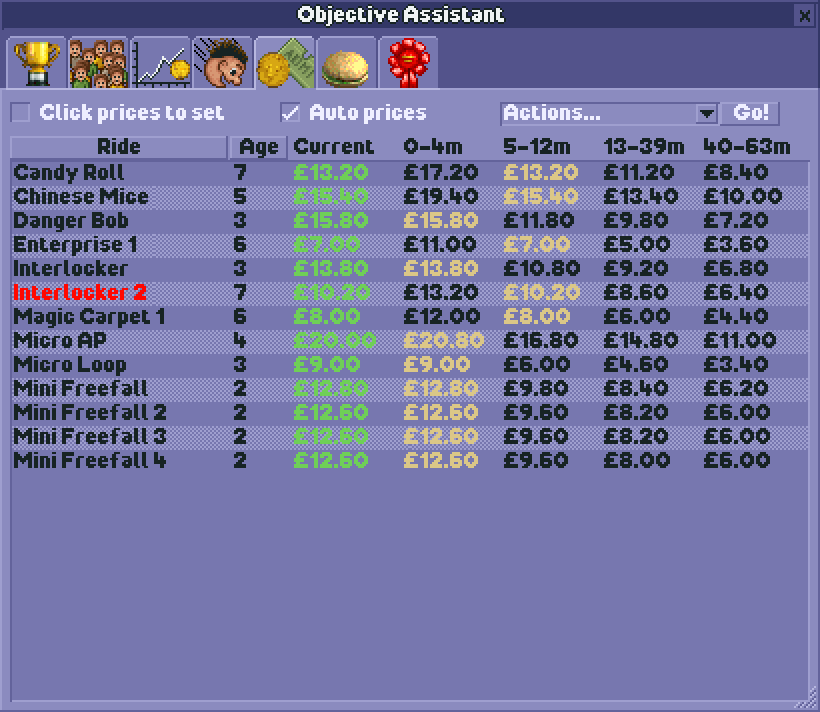
Tab 5: Ride prices
- Maximise your monthly ride ticket income.
- Show a table of ride prices you can charge at certain age bands. The highlighted one is the current max price.
- The current price is shown first: green means maxed out, red too much to ride, orange too low. Black is OK but not optimal.
- Buttons to set all rides to max price, long-term unchanging price, low price or free. Free transport rides are unaffected.
- "Auto prices" will auto update all ride prices to their max, even if you close the plugin.
- "Click prices to set" allows you to click in the table to set the ride to that price.
- The table goes up to 63 months because if you haven't achieved your objective in 8 years then you probably don't need more columns on this table anyway.
- Although it doesn't display more than 63 months the auto prices does keep working past then.
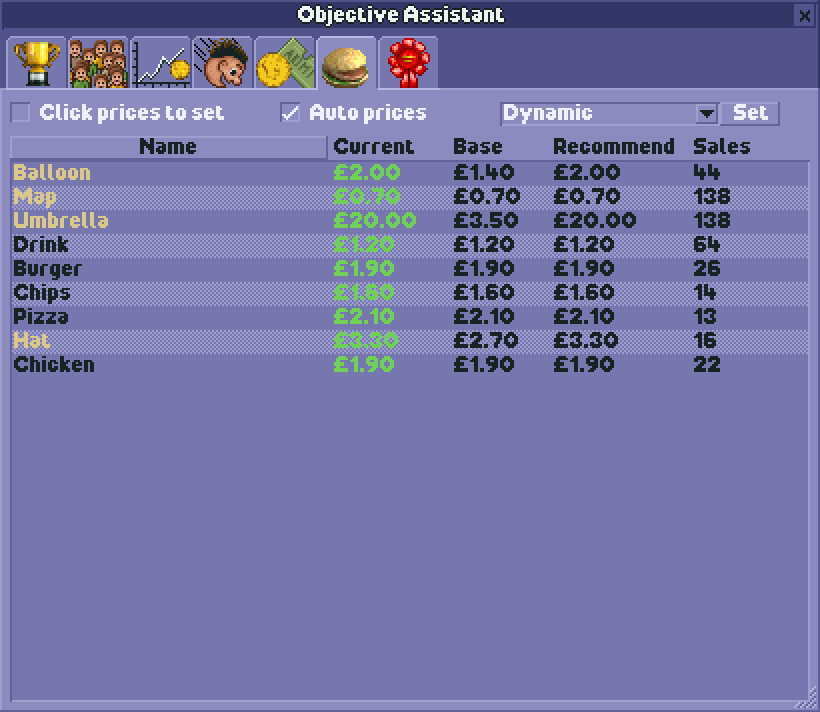
Tab 6: Food and merch prices
- Maximise your monthly food, drink and merchandise income.
- Similar to ride prices, this lets you automate stall prices.
- Higher prices means more profit, but too high prices will mean fewer sales, and people being hungry / thirsty.
- Various modes:
- "Dymanic" adjusts prices to the current weather and is a good compromise between making sales and making profit.
- "Recommended" takes the average annual weather, encourages food/drink sales, and profitises on merch.
- "Sell more" encourages maximum sales volume but doesn't have as high profit margins.
- "Price gouge" maximises profit but guests may be less likely to buy.
- Umbrellas are always set to £20 and maps to £0.70.
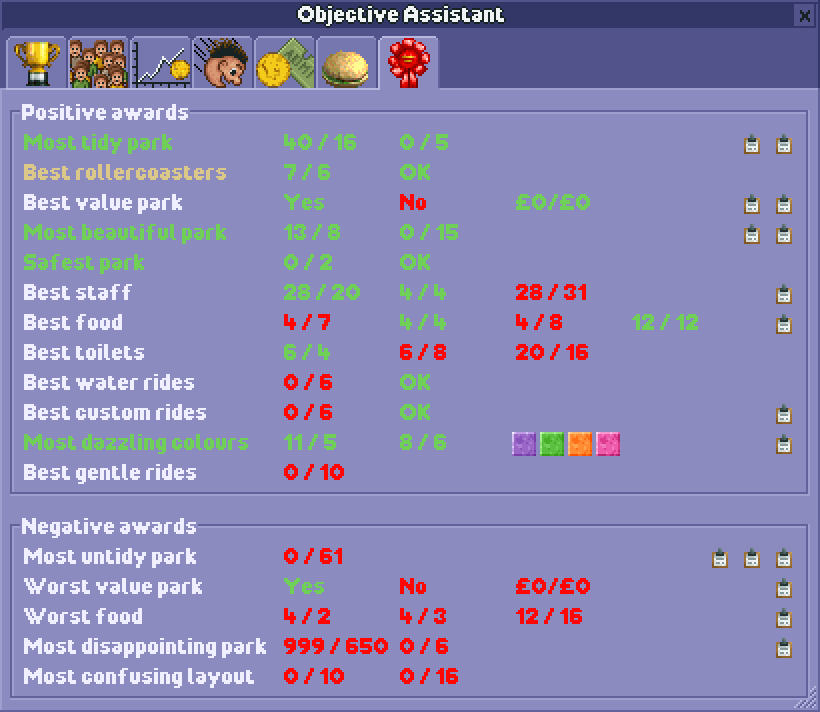
Tab 7: Awards
- Maximise your guest generation by tracking your awards progress.
- Show all available awards, their requirements, and which ones you're eligible for.
- Mouse-over each requirement to show more info.
- Awards turn green when you're eligible, and gold when you're awarded them.
Tab 8: Stat requirements
- Show rides stat requirements
- Identify which rides are currently failing stat requirements
- Improve your rides' ratings by making sure they meet all requirements
How to use
- Download objective-assistant.js
- Place it in your OpenRCT2 plugin folder:
- Windows: %APPDATA%\OpenRCT2\plugin\
- macOS: ~/Library/Application Support/OpenRCT2/plugin/
- Linux: ~/.config/OpenRCT2/plugin/
- Launch or restart OpenRCT2
- Load or start a park, and open the Objective Assistant plugin from Map dropdown